Smilestar Font: A Handwritten Typeface That Elevates Craft Projects
If you're a creative maker, small shop owner, or printable designer, you know how important it is to choose the right typeface for your products. Smilestar, a beautiful handwritten font from Script Amp, brings a unique blend of elegance and charm that works perfectly across both digital and physical craft projects. Whether you're designing product labels, greeting cards, or SVG-style signage, this font adds a personal touch without sacrificing clarity or professionalism.
The Charm and Versatility of Smilestar
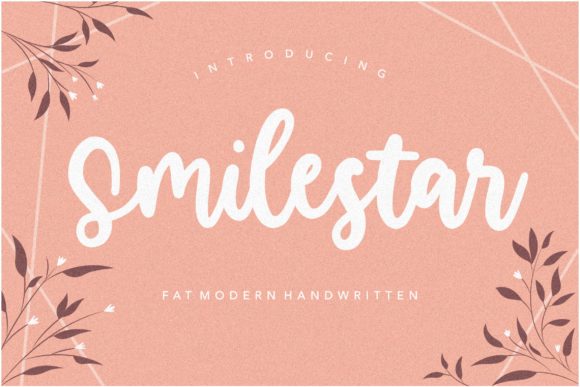
Smilestar stands out with its soft, flowing strokes and subtle character variations that mimic natural handwriting. It has a warm and inviting personality, making it ideal for designs where you want to evoke a sense of authenticity and care. Unlike many script fonts that can be difficult to read or overly stylized, Smilestar strikes a balance between artistic flair and legibility. This makes it especially useful when creating content that needs to be quickly understood—like product tags or seasonal greetings.
Perfect for Physical and Digital Creations
As a crafter who often uses design software like Cricut or Silhouette, I know how frustrating it can be when a font looks great on screen but doesn’t translate well into print or cut vinyl. Smilestar, however, handles beautifully in both scenarios. Its clean lines and open letterforms ensure it remains readable even at smaller sizes, which is essential for stickers, tags, and packaging inserts.
- Candle Labels: The gentle curves of Smilestar add a luxurious feel to candle jars, making them perfect for boutique-style shops or holiday gift sets.
- Birthday Invitations: With its friendly yet elegant look, this font helps create a heartfelt vibe that guests will appreciate.
- Farmhouse Signs: Use Smilestar as the main headline on a rustic wooden sign for an instant pop of modern charm.
- Wedding Welcome Boards: Create a personalized welcome message with a font that feels romantic and approachable.
- Printable Wall Art: Pair Smilestar with a minimalist layout for wall art that’s both stylish and easy to read.
- Boutique Tags: From clothing to handmade soaps, Smilestar elevates brand identity with a consistent, high-quality aesthetic.
- Holiday Packaging: Add a festive yet sophisticated touch to gift boxes, bags, or wrapping paper using this versatile font.
Boosting Brand Consistency and Emotional Appeal
A strong brand identity isn't just about color schemes or logo design—it's also about typography. Smilestar gives your designs a signature style that customers can recognize and trust. When used consistently across product labels, social media graphics, and web design, it builds a cohesive visual language that speaks directly to your audience.
Handwritten fonts have a special emotional appeal because they suggest thoughtfulness and individuality. Smilestar captures that feeling effortlessly, helping your products stand out in a crowded market. For handmade sellers and small business owners, this kind of font can make all the difference in perceived quality and customer connection.
Using Smilestar in Display and Decorative Text
This font is best suited for display use rather than long paragraphs of body text. Its expressive nature shines when used for short phrases, names, titles, and decorative wording. Think about how it could enhance a quote on a planner page or serve as the title for a new line of home décor. The included alternates and ligatures allow for customization while maintaining a professional finish.
I've found that Smilestar works particularly well in layered designs. Pair it with a clean sans serif font for contrast in wedding invitations or use it alongside a bold display font for eye-catching signs. These combinations help maintain readability while adding visual interest to your layouts.
Readability Tips for Real-World Use
While Smilestar is designed for beauty, it’s also practical. Here are some tips to ensure it performs well in different applications:
- For Cutting Machines: Always test your design at full scale before cutting. Smilestar’s delicate strokes may need slight adjustments in stroke width or spacing depending on your material.
- Small Stickers and Product Labels: Avoid using too many swashes or flourishes in tiny text areas. Stick to the base characters for maximum clarity.
- Printed Cards and Invitations: Use a higher-resolution preview when setting up your mockups. This ensures the font looks crisp and polished when printed.
- Digital Printables: Make sure your PDFs are embedded properly so clients see exactly what you intended. Smilestar includes standard and OpenType features, giving you more creative control over your final output.
Font Pairing Suggestions
One of my favorite things about working with Smilestar is how well it pairs with other fonts. Here are a few tried-and-true combinations based on real project use:
- With a Clean Sans Serif: Great for product packaging where you want a modern contrast to the handcrafted feel of Smilestar.
- With a Simple Serif: Ideal for wedding stationery or luxury branding, offering a timeless elegance.
- With a Bold Display Font: Perfect for signs or banners where you want Smilestar to complement a strong headline.
These pairings not only enhance visual appeal but also guide the viewer’s eye naturally through the design. Smilestar adds warmth and personality without overwhelming the rest of the layout.
Commercial Use and Licensing
As someone who sells digital downloads and physical products online, I always check licensing details before purchasing a font. Smilestar is a commercial font, meaning it's fully licensed for use in product designs, templates, and client work. You can confidently use it for:
- Physical products (mugs, shirts, tote bags)
- Digital printables and SVG-style designs
- Product labels and tags
- Merchandise sold on Etsy or other platforms
- Client-based work such as logos or branding packages
Make sure to review the specific license agreement to confirm it covers your intended use. Many premium fonts offer clear guidelines for commercial use, and Smilestar appears to be one of them. This gives peace of mind when investing in a font for your growing creative business.
Designing for Different Backgrounds
One standout feature of Smilestar is its ability to remain legible and attractive on busy backgrounds. As a label designer, I’ve used it on textured kraft paper and patterned fabric with excellent results. The font’s subtle weight variations help it stand out against complex visuals, ensuring your message stays front and center.
When using Smilestar on darker or intricate backgrounds, consider increasing the stroke weight slightly or adjusting the spacing for better visibility. These small tweaks can make a big difference in how your design is received by customers.
Why Smilestar Belongs in Your Design Toolkit
Whether you're crafting for a local market or preparing digital assets for your next Etsy launch, Smilestar offers a reliable and stylish option for your typographic needs. Its versatility means you can use it across multiple formats—from SVG files for cutting machines to high-resolution JPEGs for web design and social media graphics.
I’ve incorporated Smilestar into several of my recent projects, including custom planner pages and holiday-themed stickers. Each time, it added a layer of sophistication that elevated the overall look. For those looking to build a stronger brand identity with a creative font that doesn’t compromise on quality, Smilestar is a must-have.
From the moment you start using it, Smilestar proves itself as a font that blends beauty and functionality. It’s not just another script font—it’s a design asset that supports your vision and enhances your product presentation in ways that matter to your customers.